Read the Instructions carefully and watch the demo video (SLO) for paying fee in online mode.
Type your Register Number without using space or hypen (Ex:22XX026), then type the Password and select the current year (2026-2027) and then click Login Button.
Enter the OTP received from your registered mobile number.
Verify the details displayed on the login page.
Click on the Gobi Arts & Science College logo on the top left corner.
Click on the Fee logo to pay the fee.
Click on the button for payment.
Gateway charges is different for different modes of payment. Check all the options & choose an option convenient to you.
As the transaction may take a few minutes to complete, do not refresh, reload or press back or any other button till the transaction is complete.
Connect with an uninterrupted internet connection for a seamless transaction.
After the Payment the transaction ID is received as SMS from your Registered Mobile number
Take a screenshot of transaction id for your reference.
To view your e-receipt, click Print button in Payment History.
Click (download or save option) and select the download format of e-receipt.
A fine amount will be levied from 04.12.2026 onwards.
In case payment has been deducted successfully and the receipt is not generated immediately, please note that this issue is specific to your transaction. On confirmation of transaction status, system automatically generates receipts for all successful payments.
You can expect the receipt to be generated automatically within the next 48 Hours.
Students are directed to pay the fees ONLY from the CMS portal.
Students should NOT use GASC mobile app for payment of fees.
While using the payment app like Gpay PhonePe, etc, if the UPI timer expires, the students should CLOSE the payment app & then pay the fees ONLY from the CMS portal, once again.
Online Exam Fee Payment time 07.00AM to 1 0.00PM (Including Holidays)
*** Note your transaction number for future reference.
For further clarification, contact : Fees Counter at College Office.
I hereby affirm that I have read the instructions and hence proceed to pay the fee.
 to pay the fee.
 button for payment.
 button in Payment History.
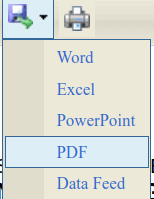 (download or save option) and select the download format of e-receipt.
