Read the Instructions carefully and watch the video for paying Exam fee online.
Type your Register Number without using space or hypen (Ex:25XX025), Password given by class co-ordinator and select the current year (2026-2027) then click Login Button.
Verify the details displayed on the login page.
Click on the Gobi Arts & Science College logo on the top left corner.
Click on the Fee logo to pay the fee.
Click Pay Misc. Fees →Pay Misc.
Click on the Pay Button for payment.
Gateway charges is different for different modes of payment. Check all the options & choose an option convenient to you.
As the transaction may take a few minutes to complete, do not refresh, reload or press back or any other button till the transaction is complete.
Connect with an uninterrupted internet connection for a seamless transaction.
After the payment, you will receive a transaction ID to your registered mobile number.
Take a screenshot of transaction id for your reference.
Download your e-receipt, by clicking View Misc. Receipts.
Click View Receipt to download your receipt.
Click(download option) and select the format to download your e-receipt or Print your e-receipt.
In case payment has been deducted successfully and the receipt is not generated immediately, please note that this issue is specific to your transaction. On confirmation of transaction status, system automatically generates receipts for all successful payments.
You can expect the receipt to be generated automatically within the next 48 Hours.
Students are directed to pay the fees ONLY from the CMS portal.
Students should NOT use GASC mobile app for payment of fees.
While using the payment app like Gpay PhonePe, etc, if the UPI timer expires, the students should CLOSE the payment app & then pay the fees ONLY from the CMS portal, once again.
Online Exam Fee Payment time 07.00AM to 10.00PM ( Including Holiday )
LAST DATE WITHOUT FINE : 11.09.2026
LAST DATE WITH FINE AMOUNT Rs.60/- : 16.09.2026
LAST DATE SPECIAL PENALTY Rs.500/- : 21.09.2026
LAST DATE FOR ONLINE EXAM FEE PAYMENT WILL NOT BE EXTENDED
After the Last date for online Exam fee payment, portal will not be opened on any account.
*** Note that your Transaction number for the future reference.
For Further Clarification Contact : Fees Counter at the College Office.
I hereby affirm that I have read the instructions and hence proceed to pay the Exam fee.
 on the top left corner.
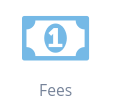 to pay the fee.
 for payment.
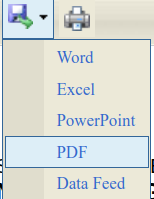 (download option) and select the format to download your e-receipt or Print your e-receipt.